go-recognizer
Face detection and recognition for Go, built on top of dlib
via go-face. It wraps the
lower-level go-face API into a small, batteries-included Recognizer type:
load a photo, find faces, identify them against a labeled dataset, and draw
the results back onto the image — in a handful of method calls.



[!NOTE] dlib’s face pipeline (shape-predictor landmarks + a custom ResNet-29 metric-learning descriptor) predates most of the last decade’s face recognition research – even the newest dlib-compatible alternatives (2021/2024) are incremental tweaks to that same older approach, not a leap to what’s state of the art today. For actively-developed, modern models (YuNet, RetinaFace, ArcFace-family, SFace, GhostFaceNet…), see go-onnxface.
Features
- Detection — find one or many faces in an image, sorted left to right.
- Recognition — identify detected faces against a dataset of known people.
- Incremental dataset updates —
AddImageToDatasetkeeps the identifier in sync as each face is added; no need to rebuild the whole sample set. - Match distance/confidence —
Identify/IdentifyMultiplesreturn the matched face’sDistanceand a normalizedConfidencescore, not just an ID. - Landmarks — detected faces carry their
Shapes(facial landmark points). Defaults to 5 points (eye corners, nose base); setrec.Model.LandmarkbeforeInitto opt into the 68-point model for full facial contour (jawline, eyebrows, nose bridge, eyes, lips). - Swappable model files —
rec.Model.Landmark/Descriptor/CNNlet you point Init at differently-named or fine-tuned model files instead of go-face’s defaults. - Configurable matching — tune the distance
Toleranceused to accept a match. - CNN or HOG detector — trade speed for accuracy with
UseCNN. - Grayscale preprocessing — optional, via
UseGray. - Beyond JPEG input — go-face’s own file loader only understands JPEG,
but with the default
UseGray = true, go-recognizer decodes the source image with Go’s standardimagepackage first (JPEG and PNG are supported out of the box) and re-encodes it before handing it to go-face, so PNG sources work without extra steps. This doesn’t apply whenUseGray = false: the original file is passed straight through, so it must already be a JPEG. - Dataset persistence — save/load known faces to/from a JSON file.
- Drawing helpers — annotate the source image with boxes, labels, and landmark points for the faces found.
- Typed errors —
AddImageToDataset/RecognizeSingle/Identify/LoadDatasetreturn sentinel errors (ErrNoFace,ErrNotSingleFace,ErrNoMatch,ErrDatasetFileNotFound) checkable witherrors.Is, instead of matching on error text. See Errors below.
Requirements
go-recognizer depends on go-face, which in turn requires dlib (>= 19.10) and the libjpeg development headers to compile.
go-face uses cgo, so CGO_ENABLED=1 is required at build time (this is the
default on most setups, but some environments/CI images turn it off). If you
see errors like undefined: face.NewRecognizer or undefined: face.Descriptor
instead of a compiler error, that’s almost always CGO being disabled — run
go env -w CGO_ENABLED=1 or set the env var for the build.
Ubuntu 18.10+, Debian sid
Latest versions of Ubuntu and Debian provide a suitable dlib package, so just run:
# Ubuntu
sudo apt-get install libdlib-dev libblas-dev libatlas-base-dev liblapack-dev libjpeg-turbo8-dev
# Debian
sudo apt-get install libdlib-dev libblas-dev libatlas-base-dev liblapack-dev libjpeg62-turbo-dev
macOS
Make sure you have Homebrew installed.
brew install dlib
Windows
Make sure you have MSYS2 installed.
- Run
MSYS2 MSYSshell from Start menu - Run
pacman -Syuand if it asks you to close the shell do that - Run
pacman -Syuagain - Run
pacman -S mingw-w64-x86_64-gcc mingw-w64-x86_64-dlib5.- If you already have Go and Git installed and available in PATH uncomment
set MSYS2_PATH_TYPE=inheritline inmsys2_shell.cmdlocated in MSYS2 installation folder - Otherwise run
pacman -S mingw-w64-x86_64-go git
- If you already have Go and Git installed and available in PATH uncomment
- Run
MSYS2 MinGW 64-bitshell from Start menu to compile and use go-face
Other systems
Try installing dlib/libjpeg with your distribution’s package manager, or compile dlib from source. go-face won’t work with old dlib packages such as libdlib18. If your system isn’t covered here, open an issue with the distribution/version and we’ll try to help.
Docker
examples/Dockerfile builds dlib from source (Alpine
has no dlib package) and compiles the detection example against it, ending
with a ~50MB runtime image. Useful as a reference for containerized builds,
and for the compiler/CMake compatibility patches it applies – dlib’s
released source doesn’t build out of the box with GCC 15+ or CMake 4.x.
Installation
go get github.com/leandroveronezi/go-recognizer
import "github.com/leandroveronezi/go-recognizer"
Models
shape_predictor_5_face_landmarks.dat, mmod_human_face_detector.dat and
dlib_face_recognition_resnet_model_v1.dat are required at runtime. Download
them from the dlib-models repo:
mkdir models && cd models
wget https://github.com/davisking/dlib-models/raw/master/shape_predictor_5_face_landmarks.dat.bz2
bunzip2 shape_predictor_5_face_landmarks.dat.bz2
wget https://github.com/davisking/dlib-models/raw/master/dlib_face_recognition_resnet_model_v1.dat.bz2
bunzip2 dlib_face_recognition_resnet_model_v1.dat.bz2
wget https://github.com/davisking/dlib-models/raw/master/mmod_human_face_detector.dat.bz2
bunzip2 mmod_human_face_detector.dat.bz2
Optional: shape_predictor_68_face_landmarks.dat for full facial contour
landmarks (see rec.Model.Landmark below). It’s a much larger download
(~95MB uncompressed, vs ~9MB for the 5-point model), so it’s opt-in rather
than required.
wget https://github.com/davisking/dlib-models/raw/master/shape_predictor_68_face_landmarks.dat.bz2
bunzip2 shape_predictor_68_face_landmarks.dat.bz2
Examples
Runnable versions of the examples below live in examples/, one
per subfolder. Run them from inside examples/ so the relative fotos/models
paths resolve, e.g. cd examples && go run ./detection.
Face detection
package main

import (
	"fmt"
	"path/filepath"

	"github.com/leandroveronezi/go-recognizer"
)

const fotosDir = "fotos"
const dataDir = "models"

func main() {

	rec := recognizer.Recognizer{}
	err := rec.Init(dataDir)

	if err != nil {
		fmt.Println(err)
		return
	}

	rec.Tolerance = 0.4
	rec.UseGray = true
	rec.UseCNN = false
	defer rec.Close()

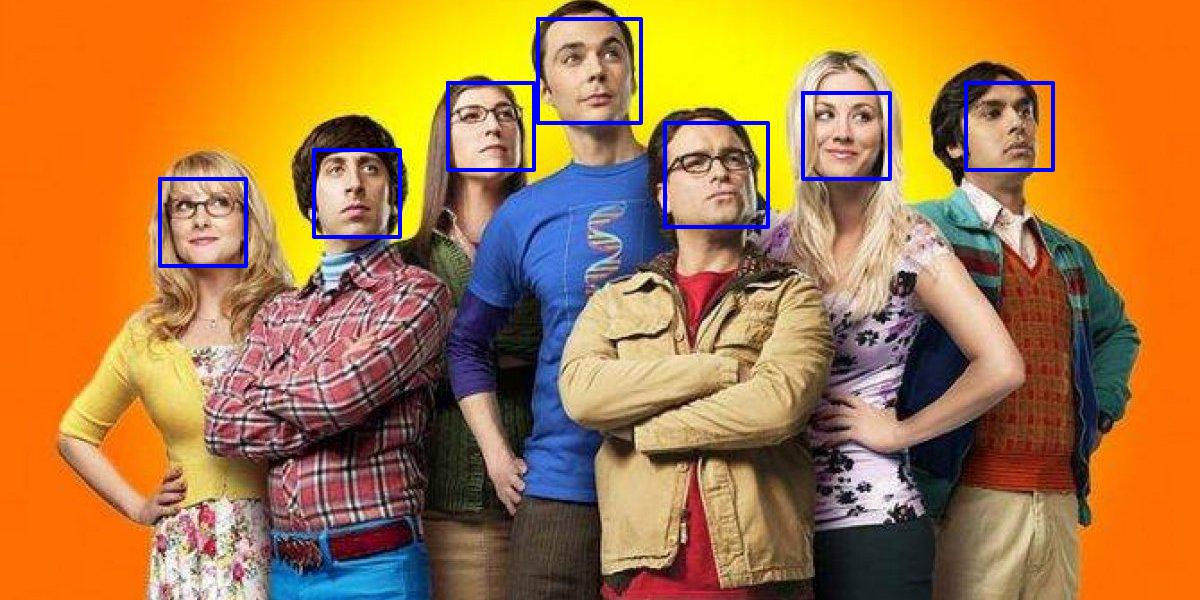
	faces, err := rec.RecognizeMultiples(filepath.Join(fotosDir, "elenco3.jpg"))

	if err != nil {
		fmt.Println(err)
		return
	}

	img, err := rec.DrawFaces2(filepath.Join(fotosDir, "elenco3.jpg"), faces)

	if err != nil {
		fmt.Println(err)
		return
	}

	rec.SaveImage("faces2.jpg", img)

}
Face recognition
package main

import (
	"errors"
	"fmt"
	"path/filepath"

	"github.com/leandroveronezi/go-recognizer"
)

const fotosDir = "fotos"
const dataDir = "models"

func addFile(rec *recognizer.Recognizer, Path, Id string) {

	err := rec.AddImageToDataset(Path, Id)

	switch {
	case errors.Is(err, recognizer.ErrNoFace), errors.Is(err, recognizer.ErrNotSingleFace):
		fmt.Printf("%s: not exactly one face, skipping\n", Path)
	case err != nil:
		fmt.Println(err)
	}

}

func main() {

	rec := recognizer.Recognizer{}
	err := rec.Init(dataDir)

	if err != nil {
		fmt.Println(err)
		return
	}

	rec.Tolerance = 0.4
	rec.UseGray = true
	rec.UseCNN = false
	defer rec.Close()

	addFile(&rec, filepath.Join(fotosDir, "amy.jpg"), "Amy")
	addFile(&rec, filepath.Join(fotosDir, "bernadette.jpg"), "Bernadette")
	addFile(&rec, filepath.Join(fotosDir, "howard.jpg"), "Howard")
	addFile(&rec, filepath.Join(fotosDir, "penny.jpg"), "Penny")
	addFile(&rec, filepath.Join(fotosDir, "raj.jpg"), "Raj")
	addFile(&rec, filepath.Join(fotosDir, "sheldon.jpg"), "Sheldon")
	addFile(&rec, filepath.Join(fotosDir, "leonard.jpg"), "Leonard")

	// No rec.SetSamples() call needed here: AddImageToDataset already
	// keeps the identifier in sync incrementally as each face is added.

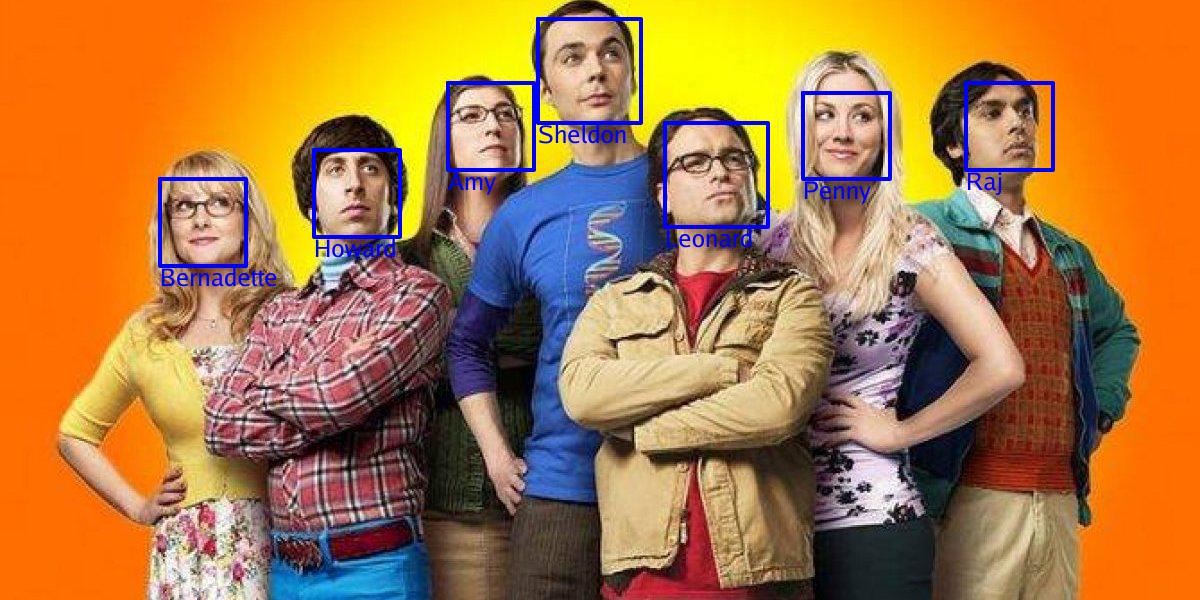
	faces, err := rec.IdentifyMultiples(filepath.Join(fotosDir, "elenco3.jpg"))

	if err != nil {
		fmt.Println(err)
		return
	}

	for _, f := range faces {
		fmt.Printf("%s: distance=%.4f confidence=%.2f%%\n", f.Id, f.Distance, f.Confidence*100)
	}

	img, err := rec.DrawFaces(filepath.Join(fotosDir, "elenco3.jpg"), faces)

	if err != nil {
		fmt.Println(err)
		return
	}

	rec.SaveImage("faces.jpg", img)

}
Face landmarks
package main

import (
	"errors"
	"fmt"
	"path/filepath"

	face "github.com/leandroveronezi/go-face"
	"github.com/leandroveronezi/go-recognizer"
)

const fotosDir = "fotos"
const dataDir = "models"

func main() {

	rec := recognizer.Recognizer{}
	err := rec.Init(dataDir)

	if err != nil {
		fmt.Println(err)
		return
	}

	rec.Tolerance = 0.4
	rec.UseGray = true
	rec.UseCNN = false
	defer rec.Close()

	f, err := rec.RecognizeSingle(filepath.Join(fotosDir, "amy.jpg"))

	switch {
	case errors.Is(err, recognizer.ErrNotSingleFace):
		fmt.Println("amy.jpg doesn't have exactly one face")
		return
	case err != nil:
		fmt.Println(err)
		return
	}

	fmt.Printf("found %d landmark points\n", len(f.Shapes))

	img, err := rec.DrawLandmarks(filepath.Join(fotosDir, "amy.jpg"), []face.Face{f})

	if err != nil {
		fmt.Println(err)
		return
	}

	rec.SaveImage("landmarks.jpg", img)

}
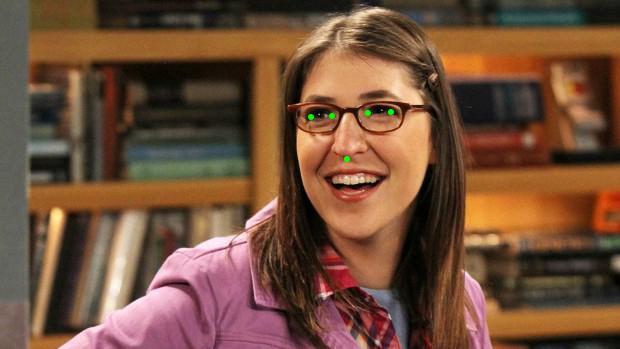
This uses the default 5-point model. For the full facial contour, download
shape_predictor_68_face_landmarks.dat (see Models) and set
rec.Model.Landmark before Init:
rec := recognizer.Recognizer{}
rec.Model.Landmark = "shape_predictor_68_face_landmarks.dat"
err := rec.Init(dataDir)
rec.Model.Descriptor and rec.Model.CNN work the same way, for the
face-descriptor (ResNet) and CNN detector model files respectively —
useful if you’re using differently-named or fine-tuned dlib models. All
three must be set before calling Init; they’re read once, at load time.
Errors
The “expected” failure conditions – no face detected, more than one
face detected, no dataset match, a missing dataset file – are exposed
as sentinel errors, so callers can branch on them with errors.Is
instead of matching on the error message text (which isn’t part of the
API contract and may change):
faces, err := rec.Identify(path)
switch {
case errors.Is(err, recognizer.ErrNotSingleFace):
	// the image doesn't have exactly one face
case errors.Is(err, recognizer.ErrNoMatch):
	// no Dataset entry within Tolerance
case err != nil:
	// something else went wrong (I/O, decode, ...)
}
| Error | Returned by |
|---|---|
ErrNoFace |
AddImageToDataset, when the image has no detected face |
ErrNotSingleFace |
AddImageToDataset, RecognizeSingle, Identify, when the image has more than one detected face (or, for RecognizeSingle/Identify, doesn’t have exactly one) |
ErrNoMatch |
Identify, when the face doesn’t match any Dataset entry within Tolerance |
ErrDatasetFileNotFound |
LoadDataset, when Path doesn’t exist |
Any other error (I/O, image decoding, etc.) is wrapped with %w, so
errors.Unwrap/errors.As still reach the underlying cause.
Contributing
Issues and pull requests are welcome. If you’re reporting a build problem, please include your OS/distribution, Go version, and the full compiler output.